Posts

Installation Procedure Of WORD PRESS On LOCALHOST

Image
  WORD PRESS On LOCAL HOST You cannot install WordPress on your computer directly.  Initially, it is about just 3 major tasks. Such as: ·        Create an environment ·        Download WordPress from its website ·        Install WordPress These 3 major tasks can be completed through some easy steps. Follow the following steps to install WordPress on your localhost successfully. Step 1: Download a local server software We need local server software to create a localhost environment; we are using MAMP for that. MAMP is a cross-platform web server solution stack package. Since WordPress is written on PHP language it requires a platform to run. The reason I am recommending MAMP is it works on both Mac and Windows operating systems. If you have Linux running on your machine you need XAMPP. Step 2: Install MAMP server Click on the downloaded MAMP and...

Social Media Optimization

Image
What is Social Media Optimization? Social media optimization  ( SMO ) is the use of a number of outlets and communities to generate publicity to increase the awareness of a product, service brand or event. Types of social media involved include  RSS feeds ,  social news and bookmarking sites , as well as  social networking sites , such as Facebook, Twitter, video sharing websites  and  blogging  sites. T he goal is to generate web traffic and increase awareness for a website. In general, social media optimization refers to optimizing a website and its content to encourage more users to use and share links to the  website   across social media and networking sites. SMO  also refers to software tools that automate this process, or to website experts who undertake this process for clients. Social media optimization is also an effective way of implementing  Online Reputation Management   (ORM), meaning that if some...

Installation procedure of Laravel

Image
                                      Laravel  is a PHP-based web framework that is largely based on the MVC architecture. Laravel was created to make it easier for developers to get started on PHP projects. With Laravel, you think less about the setup, architecture, and dependencies of a project and go straight into the meat of the project. How Laravel Works : Laravel mainly depends upon three components they are, 1.Model 2.View 3.Controller The architecture of those three components are is as follows, MODEL : Represents real-life instance or object in our code base. VIEW : Represents the interface through which the user interacts with our application. CONTROLLER : When a user takes an action, the Controller handles the action and updates the Model if necessary. INSTALLATION OF COMPOSER : Step1:  Download the composer in your sys...

Why Materialize CSS?

Image
Materialize CSS is a responsive front end framework based on Google’s Material Design. No doubt Bootstrap is the most popular CSS framework that is used by a large number of people, but if you want to try a new framework and want to try new designs then materialize is the best choice.             Materialize CSS is licensed under MIT. It is started by a team of 4 members from Carnegie Mellon University namely Alvin Wang, Alan Chang, Alex Mark and Kevin Louie. It is actively maintained by them you can see it’s GitHub page for more information.              It is very easy to get started using Materialize CSS. Simply download the files provided by them and place them in respective folders like shown below.             Materialize also follow’s grid system which has 12 columns just like Bootstrap. It uses Google materi...

Instruction to Create User Friendly Website

Image
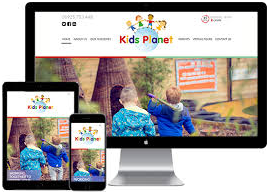
      Building a Responsive or Mobile-First Navigation : Clients should have the capacity to explore through your site effectively, paying little respect to the gadget they are seeing it on. Your navigation must be easy to find and should work on any device. It very well may be intended to be responsive, or you can utilize a versatile first design approach. Make sure to keep your Navigation Simple: Effortlessness in web design and development advancement is not a new concept. However, the present clients need (and need) things to be as simple and intuitive as possible. Rather coming up with complex page names and multi-level navigation, name each page suitably and clearly. Include your Logo and Contact Information: Your website should must and have your logo on it. In case if you don’t have your logo clearly shown on your website this means you’re missing your prime branding opportunity .Including logo you must add your contact information t...

Digital Marketing Can Help You Grow Your Business

        Digital Marketing Can Help You Grow Your Business            Online Marketing is not an only investment-wise decision but also an effective       marketing channel  that can help you grow your business.    1. Digital Marketing Is More Cost-Effective than Traditional Marketing.    2. Digital Marketing Delivers Conversion / Results.    3. Digital Marketing Helps Generate Better Revenues.   4. Digital Marketing Facilitates Interaction with Targeted Audiences.   5. Digital Marketing Caters to the Mobile Consumer.   6. Digital Marketing Builds Brand Reputation.   7. Digital Marketing Provides better Return on investment for Your Marketing Investments.   8. Digital Marketing Earns People’s Trust.   9. Digital Marketing Entices People to Take Favorable Action. ...

SEO Checklist with Free Tools

Image
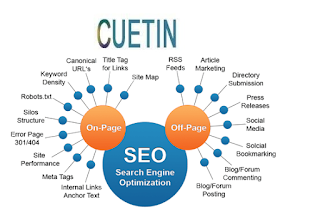
                     SEO Checklist with Free Tools Organic traffic by improving search engine ranking and finally get the conversion. Let’s check the points one by one important from an SEO perspective with a free basic SEO checklist plus tools to analyze it. SEO Checklist for On-page 1. Tracking Codes Add all tracking codes first in the basic SEO checklist. This can be event tracking’s such as phone or email. Google Analytics code for checking traffic and the Google webmasters or search console for technical details and resolving errors such as 500, 404 etc. 2. Robots.txt It is a file used by crawlers to index or non-index pages based on the allow and disallow feature. All secured and non-index able pages should be blocked. 3. Meta Title Title tags are the main indicators of what the web page is all about. It is clickable only when it explains the terms in the search query. You must check title o...